Media and Learning 2013

Wideo

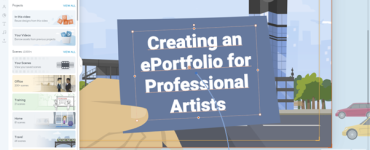
Wideo is an online platform providing the users with a way to create, edit and share their videos for free. The service is web-based so the only requirement is a browser. Users can choose (or upload) the images, fonts, animations, videos and audios. By uploading one’s own audio it is possible to make videos with voiceover explanations.
The system is currently in Beta version.

Link
Format
Language
Country
Level
Submitter
Alberto Nantiat

Author: 
Agu De Marco and Agustin Esperon

Werkzeuge für den Unterricht

In this link collection, little helpful tools for education are described. The list is updated weekly.

Link
Format
Language
Country
Level
Submitter
Ursula Simmetsberger

Author: 
Education Group GmbH
Tags

Slidemotion - create a video from your photos

Slidemotion is an automated web service enabling users to create videos with music from users’ photos, with no skills and in a few clicks. The service has many features and offers various possibilities to personalise the videos. Users can make unlimited number of free videos during the 30-days trial period. This free temporary version comes with a limit, so videos can be created with 15 visuals. After 30 day trial finishes users will still be able to play and share all of their videos but will not be able to create new ones. It is also possible to try the premium version by spending free credits, so users can decide if they like premium features and continue by purchasing a plan.

Link
Format
Language
Country
Level
Submitter
Alberto Nantiat


PlagTracker

PlagTracker is a service online that uses a checking algorithm to scan content for plagiarism. It is fast and easy to use and when it detects plagiarism, it provides also a list of all the sources, to make it easier for the user. The system does not save uploaded contents. A single document can be checked an unlimited number of times. The limit of words for a document to be checked for free is 5000. To exceed it, it is possible to subscribe for the premium version.

Link
Format
Language
Level
Submitter
Alberto Nantiat


1jour1actu - Des outils pour mieux comprendre l'info

The French website 1jour1actu - Des outils pour mieux comprendre l'info contains hundreds of contents (articles, videos, activities, dossiers, games, interactive sheets) on many different topics, ranging from Art, Literature, History, Biology, Science, to media literacy, sport, actualities.
The contents are aimed at the use in primary education classrooms. Each content is composed by attractive images, clear and short texts and a list of related contents for further deepening.
The teacher section provides them with “The highlights of the week”, files to download for the use in the classroom and an overview of the news and activities of the week.

Link
Format
Language
Country
Level
Submitter
Alberto Nantiat


Educational Technology and Mobile Learning

Educational Technology and Mobile Learning is a blog providing users, students, teachers, leaders and managers of educational ICT with articles and tools to better integrate technology into education. Practical tools, ideas and tips come along with a selection of interesting readings on the subject, tutorials and guides. An entire section of this blog is also dedicated to articles covering reviews of free educational mobile apps that work on smart devices.

Link
Format
Language
Country
Submitter
Alberto Nantiat


Zotero - managing research sources

Zotero is an easy-to-use tool that helps to gather, organize, and analyse research sources (citations, full texts, web pages, images, and other objects). It works as a reference manager software, allowing to store author, title, and publication fields and to export that information as formatted references, but also integrates some more social features like the ability to interact, tag and share the results of the performed researches in a variety of ways.
Zotero is an extension to Firefox, so it can sense when users are viewing a book, article, or other object through the browser, and —on many major research and library sites—find and automatically save the full reference information for the item in the correct fields. For the same reason, it can effortlessly transmit information to, and receive information from, other web services and applications. It can also communicate with software running on your computer (such as Microsoft Word) and be used offline (e.g., on a plane, in an archive without WiFi).
Zotero's Unicode support allows you to import, store, and cite items in any language. You can change the language of Zotero, and of the citations and bibliographies created by Zotero. Finally, there is an experimental multilingual version of Zotero, which supports storage of item metadata in more than one language (transliterations and translations).
Documentation is completely available in English and most of the pages are also translated in many other languages.

Link
Format
Language
Country
Level
Submitter
Alberto Nantiat

Author: 
Sean Takats (director). See the list of developers, alumni and contributors at http://www.zotero.org/support/credits_and_acknowledgments

Dictionary.com

Dictionary.com provides several products for reliable, free access to millions of English definitions, synonyms, spelling, audio pronunciations, example sentences, translations, example sentences, word games and study games. They are available online or through mobile applications.
Here follows a short description of the main products:
Dictionary.com: provides reliable access to millions of English definitions and meanings, spelling, audio pronunciations, example sentences, and word origins.
Thesaurus.com: is a comprehensive and efficient language tool used by professionals, students, etc., to find the synonyms and antonyms.
Quotes: offers over 60,000 famous quotations, aphorisms, proverbs, and quips. The quotes can be organized by topic, author, and popularity,
Reference.com: provides free online encyclopedia and library information.
Translator: it provides translations in more than 50 languages (in the style of Google Translate) . The number of characters is limited for each translation.
Spanish: a recently-launched product for learning Spanish at many levels. Pronunciation is still done by an automated reader with English setting up.
Word of the Day: it sends a daily email with a word to learn and its definition, selected to enrich the lexicon of the users.
The Hot Word Blog: it examines the terms tossed about around the world and draws meaning from news-making events.
Games: designed to entertain and educate. There is a variety of them on the platform.

Link
Format
Language
Country
Level
Submitter
Alberto Nantiat


Getty Museum Website

The J. Paul Getty Museum is an art museum in California that contains a collection of "Western art from the Middle Ages to the present" as well as art from ancient Greece, Rome and Etruria. The Museum provides its visitors with access to the most innovative research in the visual arts both in its Getty Center and Getty Villa sites and on the Internet.
The website of the museum offers several services useful to teachers and students. Here follow some of them:
• The education section (http://www.getty.edu/education/) offers a range of high-quality educational programs, games and resources for a variety of audiences from adults and college students, to K-12 teachers and their students, families with kids, teens, community groups, and museum educators.
• The art section (http://www.getty.edu/art/) contains videos and description cards for a number of works of art hosted at the Getty Museum and a list of selected resources about Art and Architecture (http://www.getty.edu/research/tools/article_databases/art_architecture.html) and Biographical Information (http://www.getty.edu/research/tools/article_databases/biographical.html)
• The research section (http://www.getty.edu/research/tools/) contains a list of useful search tools to find the writings contained in the Museum’s collection.
• The publications section (http://www.getty.edu/publications/digital.html) provides access to the publications that are available via Internet.
• A guide (http://www.getty.edu/education/teachers/building_lessons/guide.html) for building effective visual arts lessons

Link
Format
Language
Country
Level
Submitter
Alberto Nantiat


Tiching

Tiching is a free Spanish platform dedicated to education. It collects teaching resources and a social network has formed on top of this service. At present collected resources are more than 83000. The website is available in all official languages of Spain and in English. Tiching is aimed at the whole education community: teaching staff, students, families, publishers and anybody related in some way to the world of education.
Two search engines are provided. The internal one gives a number of options to refine researches, including language, skills, level of education, etc. The second search engine can be installed in external WordPress websites and blogs to perform searches in Tiching directly from there.
The social network has been designed for the education community and is formed by more than 25000 people collaborating from all over Spain.
There are many types of digital educational content in Tiching: activities tutorials, projects, teachers guides, etc. They are provided in many different formats such as video, text, image, interactive activity, etc.
Each content file contains:
• Basic information: title, description, image, tags, language, short URL, creator;
• Validation: it’s the internal validation process through which every resource passes when uploaded
• Thanks: it’s a feedback about the usefulness of a resource
• Save
• Comment
• Report

Link
Format
Language
Country
Level
Submitter
Alberto Nantiat


12 - 13 December 2013 Flemish Ministry of Education Headquarters, Brussels #mlconf13
Badge